
Why Your API Is Overworked: How Webhooks Solve the Polling Problem (webhook Part 1)
As a software developer, in your application or system, you often face a problem where the system makes calls to an API at regular intervals but gets the same data. No new data is returned from the API, and this makes your system costly. Repeatedly calling an API increases the API cost. This problem is called the API polling problem, where the API becomes overworked and still returns the same result.
Real-life Example of API Polling
Imagine you have a weather app that shows the current temperature. Instead of being notified automatically, your app keeps asking the weather API every 5 minutes:
“Is there new weather data?”
“Is there new weather data?”
…and so on, even if the weather hasn’t changed.
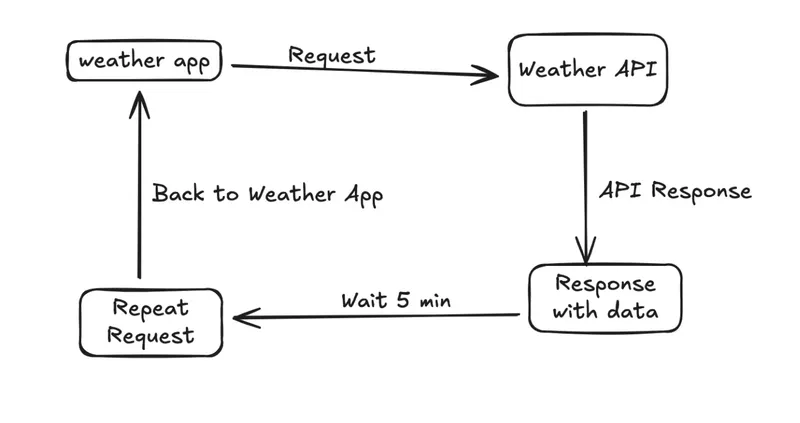
API Polling Example in JavaScript (Weather App)
// Function to get weather data from API
async function getWeather() {
try {
const response = await fetch("https://api.example.com/weather");
const data = await response.json();
console.log("Current temperature:", data.temperature);
} catch (error) {
console.error("Error fetching weather data:", error);
}
}

// Poll every 5 minutes (300,000 ms)
setInterval(getWeather, 300000);
How it works
getWeather()makes a request to the weather API.- The API responds with current temperature.
setInterval()callsgetWeather()every 5 minutes, even if nothing changed.
This is classic API polling. It works, but it’s inefficient because the app keeps asking for data, increasing API usage and cost.
In modern software development, this problem is solve by using webhooks.
What is a webhook?
A webhook is an event-driven way of communication between two systems. Instead of calling an API again and again to check for new data, a webhook sends data automatically when an event happens.
When a specific event occurs, the system triggers a webhook and sends the data to a predefined URL. Your application receives the data instantly and processes it. This reduces unnecessary API calls and helps avoid the API polling problem.In simple words, a webhook allows the API to push data to your system only when something changes, making the system more efficient and cost-effective.
How Webhooks Solve the API Polling Problem
Instead of asking the API repeatedly for updates, a webhook allows the API to send data automatically whenever an event happens. This is called event-driven communication.
A webhook works like this:
- You provide a URL to the API where your application can receive data.
- Whenever a specific event occurs (like a new order, payment, or message), the API sends the data to your URL.
- Your application receives the data instantly and can process it immediately.
In simple words:
- Polling: Your app asks for data over and over.
- Webhook: The API sends the data only when it’s needed.
This reduces unnecessary API calls, lowers cost, and keeps your system updated in real time.
The Solution in Action: The “Smart” Weather App
In our earlier example, the weather app was exhausting itself by asking for the temperature every 5 minutes. Now, let’s see how a Webhook changes the architecture.
The Webhook Scenario
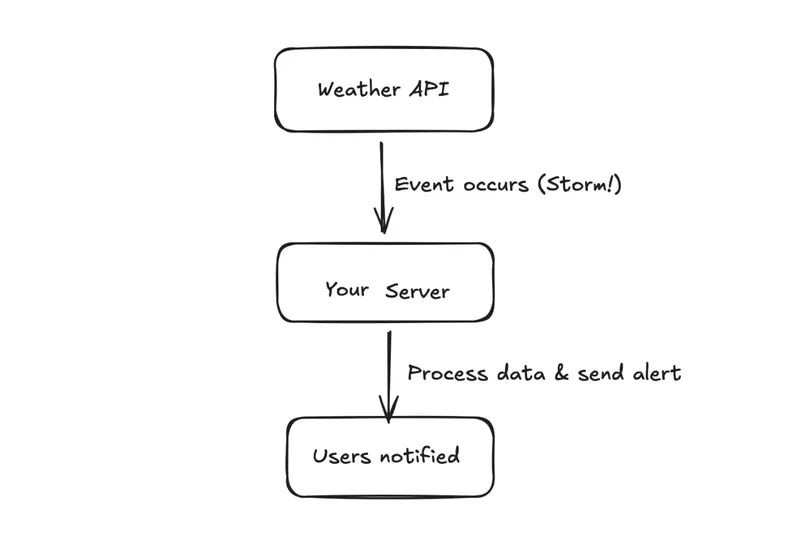
Instead of the app asking for data, the Weather Provider (like OpenWeather or a local sensor API) says: “Don’t call us. Just give us your URL, and we will ping you only when the temperature changes by more than 1 degree.”
How the Code Changes (Node.js & Express)
Notice how we no longer need setInterval. Our server simply “sits and waits” for the data to arrive.
const express = require('express');
const app = express();
app.use(express.json());

// This is the URL we give to the Weather Provider
app.post('/weather-update', (req, res) => {
const { temperature, condition, location } = req.body;

console.log(`--- WEATHER ALERT ---`);
console.log(`Location: ${location}`);
console.log(`New Temp: ${temperature}°C`);
console.log(`Condition: ${condition}`);

 // 1. Send a 200 OK fast so the provider knows we got it
res.status(200).send('Update Received');

// 2. Trigger an internal action (like a push notification to the user)
if (condition === 'Storm') {
    sendStormAlertToUser(location);
}
else {}


});

 app.listen(3000, () => console.log('Weather Webhook Listener is active!'));
How It works:
- The Silence: Your server does zero work. It sits in a “listening” state.
- The Trigger: An event happens on the API’s side (e.g., a sensor detects a storm).
- The Push: The API initiates a single connection to your server and hands over the data.
- The Processing: Your server wakes up, handles the specific data it was given, and goes back to “sleep.”
- The Result: You only process data when it is 100% relevant.
The Verdict: Polling vs. Webhook
Imagine the weather stays exactly the same for 5 hours. Here is how the two systems compare:
- The Polling App: Makes 60 API calls, wastes data, and drains battery—all to receive the exact same answer 60 times.
- The Webhook App: Makes 0 API calls. It stays completely silent, saving 100% of your resources until the weather actually changes.
Wait… There’s a Catch
Webhooks make your server a “Listener.” But because your webhook URL is public, you’ve essentially left your door unlocked.
This leads to a big question:
If your server is sitting there waiting for a message, how does it know the “Push” is coming from a friend or a foe?
If a hacker sends a fake “Payment Successful” message to your URL, will your server know it’s a lie?
Next in Part 2: Security
We’ll learn how to add a “Security Guard” to our code. We will cover:
- The Secret Handshake (HMAC): Verifying the sender’s identity.
- The Secure Code: Using Node.js to block fake requests instantly.
See you in Part 2!